
An Introduction to Agentic Media Buying
It's not rules with a chatbot bolted on. It's an agent that learns how you buy, runs the repetitive work on loops, and asks before it touches anything.

Key takeaways
- Agentic media buying is an agent doing the repeated work in your ad account with context, not fixed rules. It knows your north star KPI, your promo calendar, and what you told it yesterday.
- The work runs on loops, like an hourly MER pacing check or a weekly push of winning post IDs into a scaling campaign. The average Hudson user automates about 80% of their media buying work this way.
- What makes it work is the self-learning loop. Nothing goes live until you approve it, and every rejection and every manual change becomes context, so within a couple weeks it buys the way you do.
Agentic media buying means an agent does the actual media buying work in your ad account: scaling budgets, turning ads off, duplicating winners, building campaigns. It works off the same context you’d give a new media buyer, and it checks with you before anything goes live.
AI being cool doesn’t matter much on its own. What matters is whether it moves contribution margin. On the accounts I run with Hudson, it has. Here’s the quick walkthrough, and below that is how it actually works.
Agentic media buying vs. automated rules
Rules have been around forever. If ROAS drops below X, pause it. If CPA is under Y, raise the budget 20%. The problem is rules don’t know anything. They don’t know it’s Labor Day, that there’s a promo running, or that you said not to scale today.
An agent does. When Hudson decides whether to push spend, it looks at the last few hours, the last few days, and the last 7 days together. Then it weighs everything else it knows about the account before recommending anything. That’s the whole point of using an agent instead of a rule.
It starts by learning your account
When you sign up, Hudson goes through your ad history and every change you’ve been making as a media buyer. It starts cloning you before you’ve even logged in.
Then you do a 15-minute interview. Think about how you’d onboard a really solid media buyer. You’d say, “Spend a few days in the account. Audit it, look at our landing pages and creative, then quiz me on what you learned and ask about whatever you’re still unsure of.” That’s exactly what Hudson does. The questions are specific to your account, and that’s how you get comfortable trusting it. You can tell pretty quickly whether it understands the nuances.
A few things to get right in onboarding:
- Set your north star KPI. In-platform, Converge multi-touch attribution, Northbeam, whatever you actually make decisions off. Hudson pulls that in and optimizes to it.
- Drop in your playbook. SOPs, docs, videos, your best practices, your KPI targets. It reads all of it, which saves you from explaining it later.
- Let it organize the account. It tags and labels your campaigns so it knows what each one is for.
After that, you can ask it to scale ads, turn ads off, duplicate, or build campaigns, and it’ll do it with that context. If something looks off, it pushes back or asks.
Loops are where the 80% comes from
The average Hudson user automates about 80% of their media buying work, and almost all of that runs through loops. A loop is a piece of repeated media buying work that runs on a schedule. Because an agent is running it, it carries context the whole way through.
A few I run:
- MER pacing loop. Every hour, it checks whether MER is trending up or down across those time windows and recommends raising or lowering budget across the ABO and CBO campaigns. It’s the one my whole day runs on. More on that below.
- Winning iteration alert. When it finds a winner, it posts in Slack and tags our creative strategist to make iterations, including versions for other channels like YouTube and AppLovin.
- Weekly winners to scaling. Every week, it finds the top winning ads and duplicates them by post ID into a bid cap scaling campaign.
- Landing page cross-pollination. When an ad wins, it duplicates it into other ad sets pointed at different landing pages. I wrote up the full setup in the Cross-Pollinator strategy.
- Morning up, night down. For one client, it scales spend up every morning and pulls it back every night. That’s improved MER significantly over time.
The self-learning loop
You could grab the Claude MCP, connect it to Meta, and build your own agent that turns ads on and off and uploads creative. What’s really hard is getting it to learn, and that’s what the Converge engineers are working on around the clock.
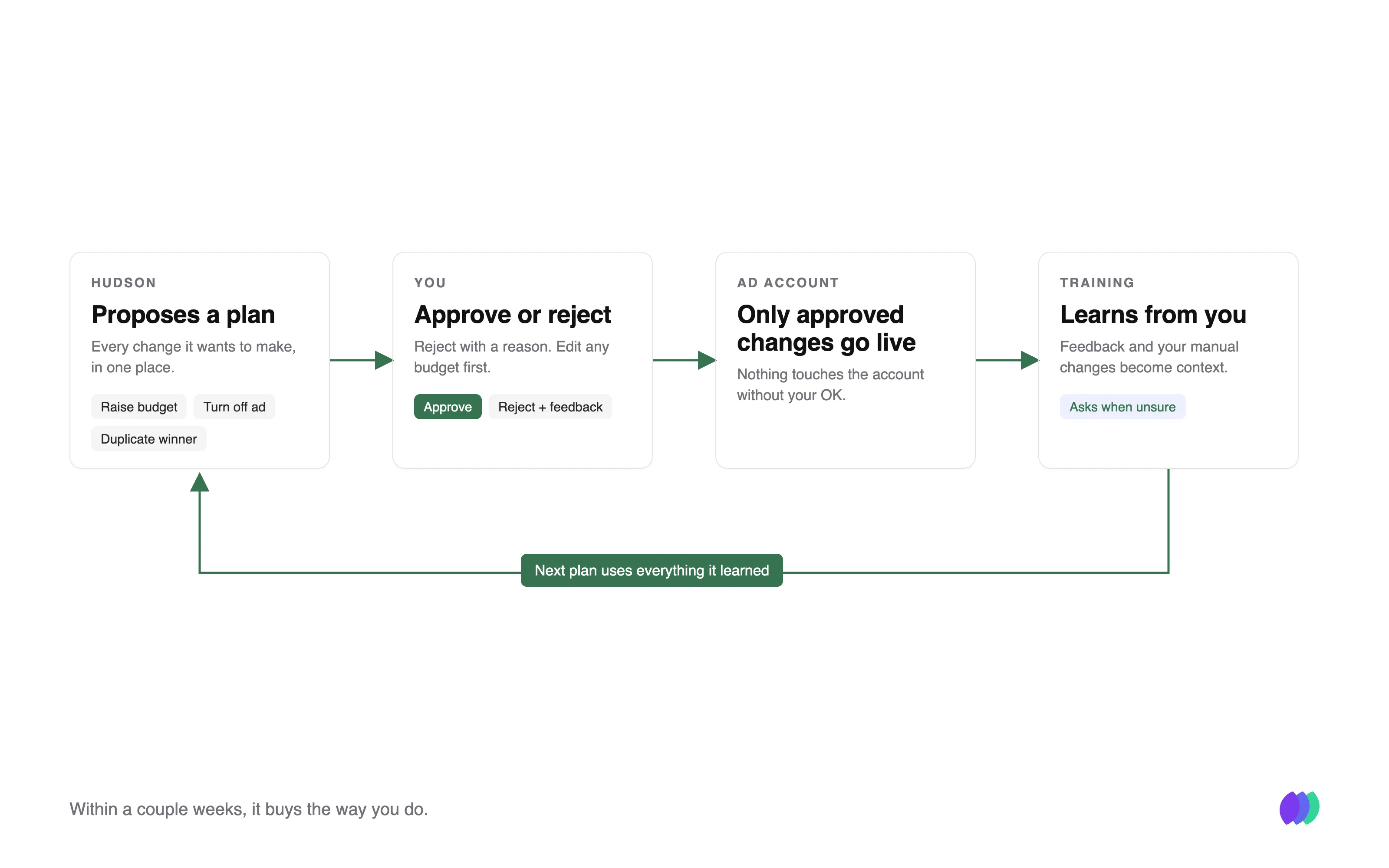
Here’s how it works:
- Every plan is approve or reject. When you reject something, you tell it why. It writes that into its source files and remembers it.
- It watches what you do outside of it. If you make a change in the ad account without Hudson, it asks about it the next day in Training. For example: “Should Converge manage the partnerships testing campaign’s budget when it drops below your ROAS bar?”
- It asks when something’s ambiguous. I normally lower spend at night. A few days ago I hand-scaled a couple of winners in the evening because they were doing well. Hudson noticed and asked something like, “You scaled some winners at night, which is unusual. Want me to bake that into the plan?” I said yes, and now it’s part of the plan.
It’s going to get things wrong at first. It’ll make mistakes and ask a lot of questions. But it never applies anything until you approve it, so you always get a chance to correct it. Over a couple weeks it gets very on the ball with exactly how you buy. And once you’ve given it feedback on something, it doesn’t make that mistake again.
What it looks like day to day
My whole day runs off one loop: the MER pacing loop. It’s one big optimization plan that checks the account every hour. It only pings me in Slack when something actually needs to change, like:
- Scaling up ads and ad sets that are trending well
- Turning off the losers from creative tests
- Duplicating winning post IDs into the scaling campaign
- Bringing back old ads that are worth another run
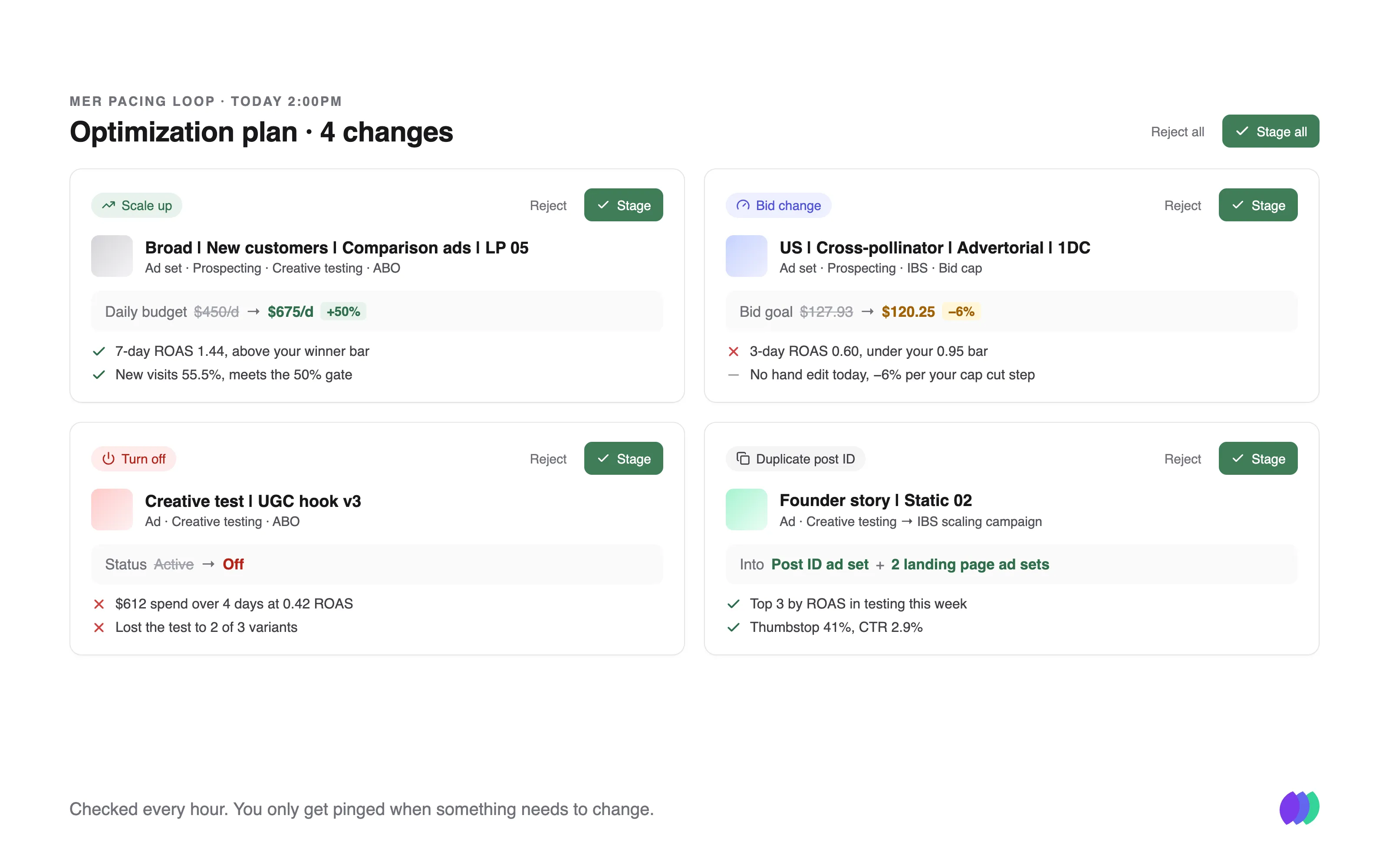
The analysis runs all day, so I don’t have to do it. When I open the plan, every change already comes with simple evidence: spend, ROAS against my bar, new visit %, and when it last touched that ad set. I just approve it, reject it with feedback, or edit the number.
I’ve been training mine for months now. These days I mostly just hit accept all.
This isn’t set it and forget it. The point is to make your media buyer 10x more effective, so they can spend their time on the work that happens outside the ad account. We work with brands that are serious about media buying and want to get better at it.
If that sounds like your team, book a demo below. Happy to talk.